LoRA training
Train a MiniMax H3 LoRA locally
MiniMax H3 is the video model, and it trains on either still images or short clips. Stills teach appearance, meaning look, style, character and lighting. Clips teach motion as well, because the model actually sees frames over time. Both produce the same adapter file, and it applies to all four H3 nodes at generation time. The unusual part is where the cost sits: the peak is set before a single training step runs, so 512px, 768px and clips all cost the same, and a 16GB card is out regardless.
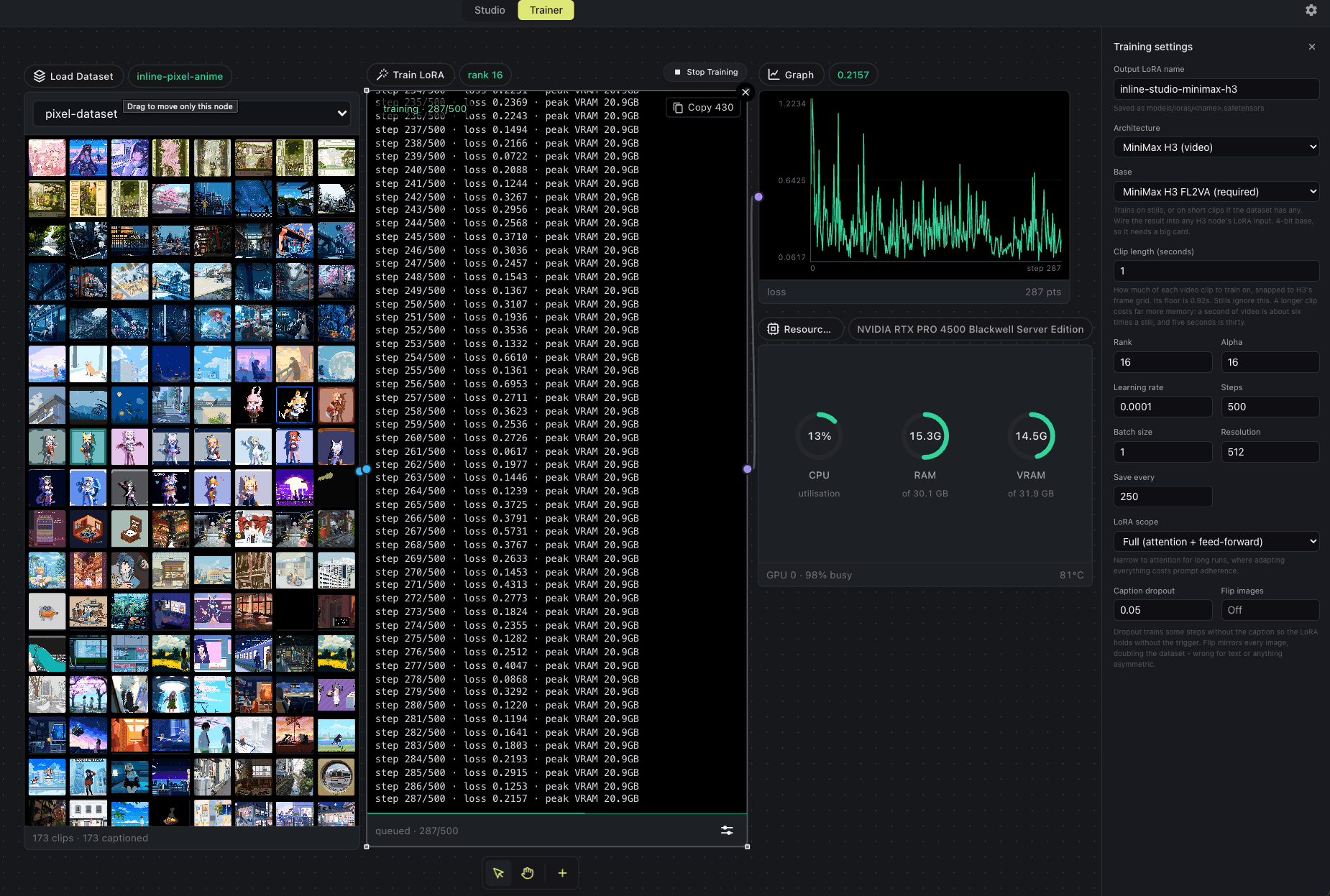
A clip LoRA training on the 173 pixel art clips below, at 512px with a 1 second clip length. The log reports loss and peak VRAM every step, the Resources panel tracks the card, and Clip length in the settings panel is what switches a run from stills to motion.
Which base to train on
Pick the architecture in the Trainer's Adjust panel, then a base within it. Training directly on a step-distilled checkpoint breaks the distillation down, so every architecture offers a way around that.
FL2VA, the only base
It is undistilled, so there is no adapter to download and nothing to drift. Train on stills, or on short clips to learn motion as well, then wire the LoRA into any of the four H3 nodes. It loads on the Reference to Video node too, which uses a different checkpoint file: the two partitions are the same architecture.
4-bit, always
H3 is 40GB after the AdaLN factorisation and 11.7GB after quantisation, so full precision is refused up front rather than offered and then failing partway through a run. There is no base-precision control for H3 for the same reason.
What the trainer needs on disk: minimax_h3_fl2va_bf16.safetensors, in models/diffusion_models/. Training needs this one: the smaller pruned and fp8 builds generate but cannot train.. Nothing is downloaded behind your back, and a run that is missing a file stops and names it.
MiniMax H3 LoRA training VRAM, measured
Peak allocation at 12 steps, rank 16, batch 1, with gradient checkpointing on. The number is torch.cuda.max_memory_allocated, so leave headroom for the CUDA context and allocator slack.
| Configuration | L40S (46GB) | L4 (24GB) | RTX PRO 4500 (32GB) | T4 (15GB) |
|---|---|---|---|---|
| 512px, stills | 20.6GB | 20.55GB | 20.49GB | 12.7GB |
| 512px, clips up to 4.5s | not measured | 20.4GB | not measured | not measured |
| 512px, 1s clips, 173-clip set | not measured | not measured | 20.9GB | not measured |
| 768px, stills | 20.6GB | 20.55GB | not measured | not measured |
| 1024px, stills | 20.6GB | not measured | not measured | not measured |
Where the peak comes from
The run has three phases that never overlap, and the tallest is not the one doing the learning:
| Phase | Peak | What is resident |
|---|---|---|
| Latent caching (video VAE) | 10.8GB | The fp32 video VAE, then dropped |
| Caption caching (Qwen3-VL) | 20.5GB | The 32B conditioner at 4-bit, then dropped |
| Training | 11.7GB | The 4-bit base, 62GB on disk, plus activations |
On a card that can hold the 32B text encoder, every resolution reads the same 20.6GB, because the peak is the caption pass rather than the activations. Clips read the same again: 20.4GB whether the clip is 0.92s or 4.5s, even though a 4.5s clip packs 8,232 rows against a still's 293. On a card that cannot hold the encoder it runs on the CPU instead, so the peak drops to 12.7GB but a step goes from 1.8s to 16.2s and the caption pass from one minute to nineteen. Measured on an L40S, an RTX PRO 4500 Blackwell, an L4 and a T4, with the clip row taken from a 500-step run over 173 pixel art clips. A 16GB card with only 16GB of RAM has room in neither and is refused before anything loads.
See the full matrix in the README, or compare all three architectures.
Training a MiniMax H3 LoRA, step by step
- 1
Get the checkpoint on disk
Drop minimax_h3_fl2va_bf16.safetensors into models/diffusion_models/. If the Train LoRA node shows an amber Base model chip, click it and the download runs from there. Budget about 124GB and a persistent volume, never an instance's scratch disk.
- 2
Build a dataset
Open the Trainer tab and add a Load Dataset node. Drop images or clips onto it, or use Load from path to point at a folder you already have. A folder import picks up NNNN.txt caption sidecars next to each file automatically. Mixed stills and clips in one dataset is fine.
- 3
Caption everything
Open the Captioning panel and either write captions by hand or run Auto-caption, which captions a clip from its middle frame. Every item needs one. An uncaptioned item still trains, but against an empty prompt, which weakens the whole run.
- 4
Set the run up
Wire Load Dataset into Train LoRA, then open Adjust. Rank 16 with alpha 16 is the default and a good starting point. Learning rate 1e-4, batch size 1, 500 to 1500 steps. Resolution 512 is the measured setting and costs the same as 768, so there is no reason to go higher for a first run. There is no precision control, because H3 is 4-bit only.
- 5
Choose stills or clips
Clip length is the one H3-specific setting. Leave it empty to train on stills. Set it to train on motion instead: 1 second is the practical floor, since H3 snaps a clip onto a 22-frame grid at 24fps and anything shorter is skipped with a note in the log. Longer clips cost no extra VRAM, so 1 to 5 seconds is all workable.
- 6
Run it and watch the log
Press Start Training. The first phase caches latents and captions and reports its progress item by item, then the 62GB checkpoint streams in, and only then do steps begin. Copy the whole log or any single line straight from the node. Checkpoints save every 250 steps by default, so a run can be stopped and resumed.
- 7
Use the adapter
Wire the finished LoRA into the lora port on any H3 node, including Reference to Video, which uses a different checkpoint file with the same architecture. Render the same seed with and without it: a LoRA that changes nothing means it never attached, and one that produces noise means something is wrong upstream.
The dataset
Add clips or images from this machine, a folder, or a Hugging Face repo. Captions are read from a dataset.json or metadata.jsonl if the set ships one, and anything without a prompt can be captioned locally before it lands.
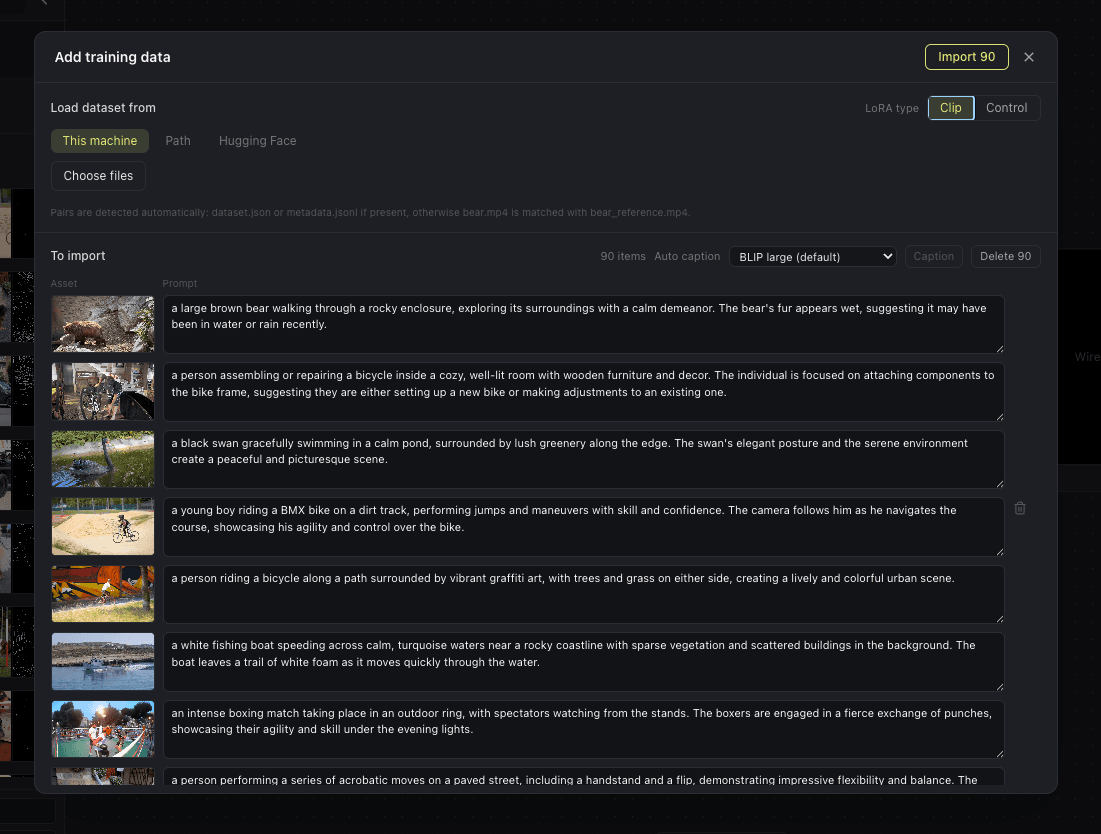
The dataset editor. Each row is one training item: the asset and the prompt that describes it.
An example dataset
A public set of 173 short pixel art clips with captions, useful for a first clip run because the style is strong enough that you can see immediately whether the adapter took. Paste the repo id into the Hugging Face tab, or point the Path tab at the train folder. Captions ship in metadata.jsonl rather than as sidecar files, which the Trainer reads directly. Six of the clips are shorter than H3's 22-frame floor and are skipped automatically, with each one named in the log.
trojblue/test-HunyuanVideo-pixelart-videosFour clips from that dataset, shown as they come, to give a sense of the training data. The dataset was curated from public Twitter posts, so each clip remains the work of its original artist.
How long a run takes
- Steps on stills are fast on a large card. About 0.63s at 512px on an L40S, 0.72s on an RTX PRO 4500 Blackwell and 1.81s on an L4, so a 1500-step run is roughly 16 minutes of actual training on the L40S and 45 on the L4.
- Clips cost about four and a half times that per step. A 1 second clip at 512px measures 3.26s a step on the Blackwell against 0.72s for stills on the same card, because a clip packs many more rows into the sequence. A 500-step clip run is about 27 minutes of training. The VRAM does not move, only the time.
- Startup is not. Getting there takes about 7 minutes first, while the 62GB checkpoint streams block by block and each one is factorised and quantised. That cost is per run and does not scale with steps, so it hurts a short run far more than a long one.
- Caching scales with the dataset, not the step count, and it runs before any of the above. A 26-image set is about a minute; 173 clips is closer to 20. The node reports it item by item so you can tell it apart from a hang.
- A T4 finishes, but at 16.2s a step with the conditioner on the CPU, which is about 40 times slower than an L40S. The download is about 124GB before any of this.
MiniMax H3 LoRA training FAQ
What GPU do I need to train a MiniMax H3 LoRA?
A 24GB card is the floor. The run peaks at about 20.6GB on an L40S, and a 16GB card cannot do it at any resolution or setting, because the caption pass alone needs 20.5GB. The 24GB figure is interpolated from that measured peak rather than measured on a 24GB card.
Why do 512px and 768px cost the same?
Because the high-water mark is the caption caching pass, not training. The 32B conditioner needs 20.5GB while it is resident, and it is dropped before the base loads. Training itself sits at 11.7GB, and going from 512 to 768 only moves the packed sequence from 310 rows to 630, which is small next to the weights.
Does an H3 LoRA learn motion?
It can. Train on stills and it learns appearance only: look, style, character and lighting. Set a clip length and it trains on frames over time, so it learns motion as well. Both write the same adapter file and both apply across all four H3 nodes. Stills are the cheaper, more predictable option and are how image LoRAs for video models are usually trained, so start there unless motion is the thing you are after.
How short can a training clip be?
About 0.92 seconds. H3's video VAE encodes clips on a 17n+5 frame grid at 24fps, so the shortest it accepts is 22 frames. Anything below that is skipped and named in the log rather than failing the run, which matters because caching a large dataset takes minutes and one bad file should not throw that away.
Do longer clips need more VRAM?
Barely. A 4.5 second clip packs 8,232 rows against a still's 293, yet the run still peaks at about 20.4GB, because the high-water mark is the caption caching pass and not the training step. Clip length costs time per step rather than memory.
Can I mix images and clips in one dataset?
Yes. The trainer encodes each item on its own, so a dataset can hold both and each one carries its own sequence layout. It is a reasonable way to teach a style from plentiful stills while a smaller number of clips supply the motion.
Can I train H3 at full precision?
No, and the trainer refuses rather than letting you start a run that would fail hours later. H3 is 40GB after the AdaLN factorisation and 11.7GB once quantised, so the 4-bit base is the only path and there is no base-precision control for this architecture.
Will the LoRA work outside OmniChar?
Yes. H3 stores attention as one fused tensor while the model runs it as three, so an adapter has to be written in the checkpoint's own key names to be readable anywhere else. OmniChar does that conversion when it saves, and reverses it when it loads, so one file works in both places and an H3 LoRA trained elsewhere loads here too. The conversion is exact rather than approximate; the only visible difference is that the file is about 40 percent larger, because the three attention projections each carry their own factors and the fused form has to keep all of them.
Can I train on the smaller H3 checkpoints?
No, train on the bf16 file. The pruned and fp8 builds generate perfectly well and are a third the download, but they ship no timestep path for the trainer to derive the modulation basis from, so it refuses them by name rather than failing part way in. You lose nothing by using the full file: the base is quantised to 4-bit for training whichever one you start from, so the smaller builds save download size and not a single byte of VRAM.
Train your first MiniMax H3 LoRA
Free and open source. Runs on macOS, Windows, and Linux.